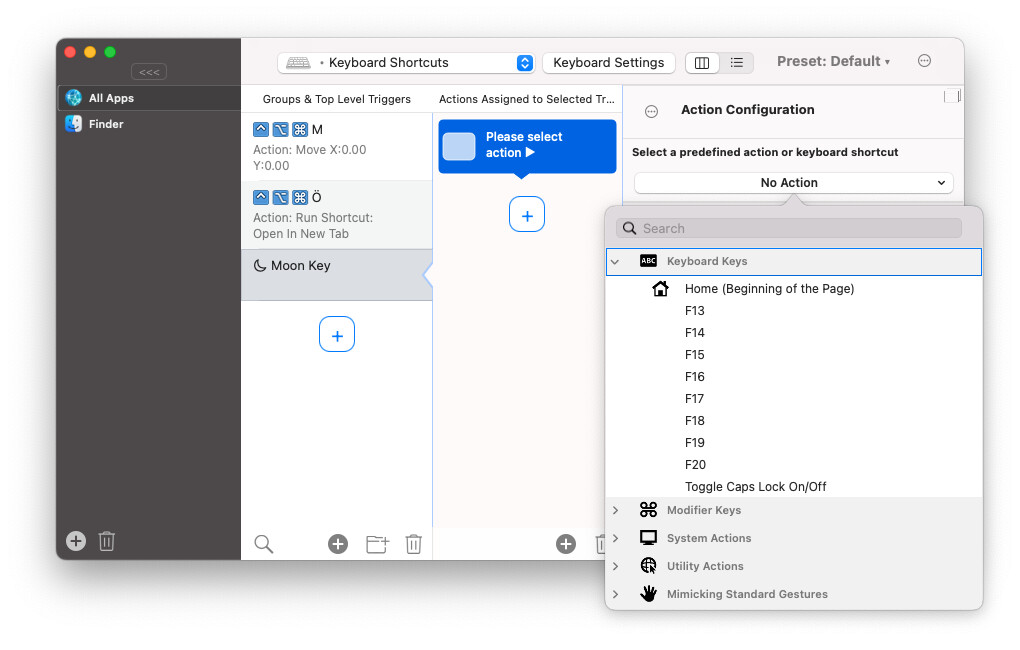
there is only F13 - F18 available in the "Keyboard Keys" options list
add more keys would helps if user choose to bind some logic with these keys on other App (e.g. Hammerspoon)

there is only F13 - F18 available in the "Keyboard Keys" options list
add more keys would helps if user choose to bind some logic with these keys on other App (e.g. Hammerspoon)
People don't seem to be aware that this is a legitimate thing. Logitech recognizes it and has all F1–24 as function options in their software. Some keyboards have all 24. Keyboard Maestro recognizes up to 20. It seems a little half-baked to only go up to F18. Is there a reason for this?
+1
I use a logitech mouse
Hi Andreas,
I know it's been a few years but I recently encountered this problem. Somehow, Karabiner is able to pick up the later F keys, though BTT (and it seams macOS itself) still doesn't. Would it be possible to implement a solution similar to Karabiner?