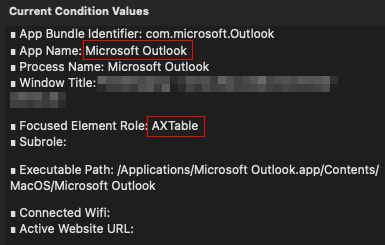
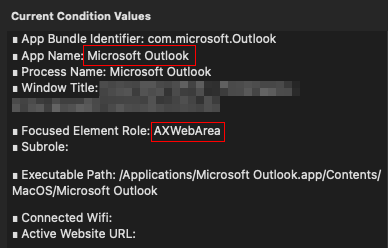
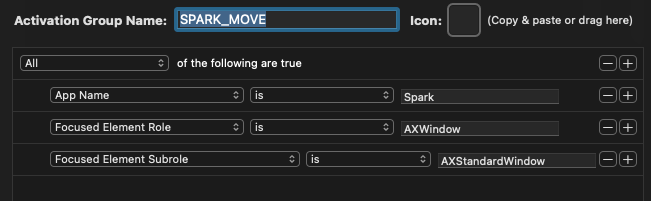
You can make that happen by using the command "Create conditional activation group."
Here's an example with Outlook.
The main Outlook window has the Focused Element Role: AXTable.
An Outlook email window has the Focused Element Role: AXWebArea.
You can check this in the Conditional Activation Group (CAG). Create the rule in the CAG and then trigger "Move Window to Next Monitor"
Is this trigger attached to the newly created CAG or to the original app? What's the name of the trigger, I can't find a CAG related trigger in the list.
Sorry in advance, I haven't used BTT at this advanced level. ::
You want to open an email you received in Spark and move the newly opened window, right? Open the email while the BTT config is running and check which Focused Element Role is active. In this case, with Spark, it's labeled as "AXWindow." BTT confirms it by turning green, as shown in the screenshot.
Thank you for your patience with this! I tried implementing your suggestion to exclude the window title.
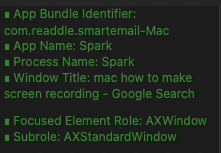
The problem appears when I'm doing a CMD+TAB back to Spark. It happens really quickly and I had to do a screen recording to capture the current condition values.
So this is odd:
The window title in that screen grab, shows my Firefox window title, which is the previous app in focus before I CMD+TAB to Spark.
So excluding Spark's window title didn't work.
Plus, the focused element and subrole keeps changing. You can see the values there are supposed to target the child window—this appears when I CMD+TAB. Not when Spark is "static".
These are the conditions when the Spark app window is where it should be:
It only happens when the focus goes from Firefox to Spark. Switching from other apps to Spark is fine.